1.2: Downloading the Application and Logging In
Downloading the Application
PC
The PC application can be downloaded either from an email invitation link sent to you, from the Microsoft Store, or from the Web application's workspace dashboard once logged in. In any scenario, you must have first been registered to a workspace by an administrator.
Via Email:
- You will receive an email invitation to use frontline.io from an administrator.
- Use one of the links in the invitation email to download the frontline.io PC application.
Via Microsoft Store:
- Open the Microsoft Store, and search for 'frontline.io'.
- Select 'Install'.
Via Web App:
- Once you have an account and access to a workspace, Log in on the Web app.
- Click on PC APP in the header of the workspace.
- Select the appropriate download option from the pop-up to download the PC application.
Mobile/Tablet
The mobile & tablet applications can be downloaded through the Google Play & Apple App Store.
Searching for frontline.io will bring up the applications, or alternatively use the links to each application through the Web App.
Visual Guide
Logging In
Log In (Web)
- Go to the frontline.io Login Page.
- Enter your email and password.
- Click Log In.
- Launch a workspace from the list of workspaces available to you.
Visual Guide
1. Select Login
2. Enter your email and password
3. Launch your workspace
Log in (PC & Mobile/Tablet)
- Open the frontline.io application.
- Enter your email and password.
- (Optional) Change your data governance region if applicable.
- Click Log In.
- Launch a workspace from the list of workspaces available to you.
Visual Guide
Enter you email
Enter your password
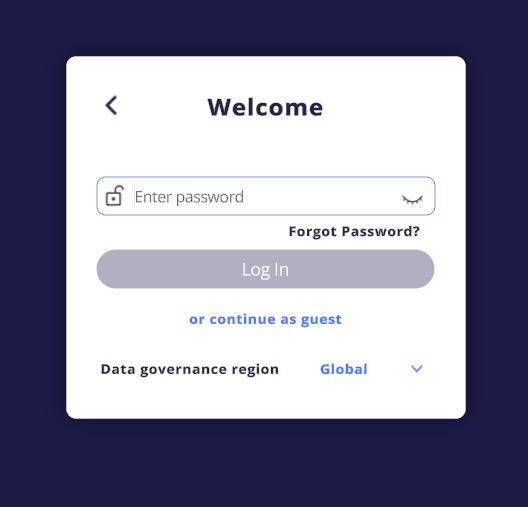
(Optional) Select your Data governance region
(Optional) Select your Data governance region
Select your workspace
Related Articles
1.1: Creating an Account
Introduction frontline.io's Platforms frontline.io works across multiple platforms, including the web application, PC application, and extended reality environments such as VR, AR, XR, and mobile apps. Your single frontline.io account gives you ...2.2: Setting up a Project
Workspaces & Projects can be viewed in both the PC and Web applications, but editing workspaces or creating new projects must be done through the Web application. Step 1: Create a New Project Projects are containers for your Digital Twins, ...Part 4: Editing a Digital Twin
The Digital Twin Editor The Digital Twin Editor is a PC application, accessible to both regular and advanced content creators on the frontline.io platform. It enables users to structure model hierarchies, define metadata, apply materials, and ...MR - Getting Started: How to Log In to XR Devices with frontline.io
How to Log In to XR Devices with frontline.io Overview When you open the frontline.io app on an XR device, the login screen gives you several ways to sign in. This article walks through all four login options so you can choose the one that suits your ...Introducing frontline.io - Technical Specifications
Updated for V25.4 Introduction What is frontline.io frontline.io is a unified platform for AR and VR training and support, designed to eliminate the need to switch between multiple applications. With its wide range of features and seamless ...